
Beginner's Guide: How To Get Started on STRATO

Earn real yield on gold, silver & crypto — live on STRATO.
Launch AppA beginner's guide to the platform, from your first bridge to your first yield position.
Gold-bugs, Silver-fiends, DeFi degens, magic-internet money traders: STRATO is home for all of you. And don't worry: as DeFi platforms go, it's much easier to use than other platforms. That said, it can still be confusing for those just getting started, but this guide will get you from zero to hero in just a few minutes.
First, what is STRATO: STRATO is a DeFi platform focused on empowering you to put hard assets, like gold, silver, and stocks, to work, but it also supports major crypto assets. For example, you can borrow stablecoins against your on-chain gold and use those tokens to earn fees or yield through typical DeFi activities.
You bridge assets in from Ethereum (and other networks), and the platform gives you tools to swap them, borrow against them, earn yield on them, and withdraw them. The core sections of the app are Fund, Portfolio, Swap, Borrow, Earn, Rewards, and Withdrawals.
Our native stablecoin is USDST. You'll use USDST for transaction fees, for borrowing, for minting, and for most earning routes on the platform. Getting comfortable with USDST is the first step to using STRATO.
Part 1: Make an Account and Bridge Your First Assets
Open the STRATO app and create an account with your email and then connect a wallet. Once your wallet is connected:
- Go to "Fund" on the left-hand side.
- Choose Bridge In.
- Select your source network (Ethereum, Linea, or Base).
- Choose the asset you want to bridge. STRATO supports ETH, wstETH, rETH, WBTC, USDC, USDT, PAXG, XAUt, syrupUSDC, and other listed assets.
- Enter the amount and confirm the transaction in your wallet.
- Wait for the balance to appear in Portfolio. Bridging from Ethereum takes about 15 minutes.
Your first 10 transactions on STRATO are free. Each time you bridge assets in, you receive 10 gas-free transaction vouchers. After those run out, transactions cost ~$0.01 each, paid in USDST. Make sure to keep a small USDST balance at all times for gas.
A good first deposit: 0.10 ETH from Ethereum. After the bridge completes, it shows up in Portfolio as ETHST, and you can swap it, use it as collateral, or move it into an earning product.
Part 2: Reading the App
After bridging, each section of the app offers something unique:
Portfolio is where you check on everything, as you can probably guess. It shows your available balance (free to use, swap, or withdraw), your collateral (locked to support a borrowing position), and your vault or pool positions (actively earning).
The app uses a few terms you'll see often:
APY / Yield is the return shown on each product. It's a percentage, and it moves based on pool activity and market conditions.
Interest is the return earned from savings, lending, or vault positions. It grows your position over time.
Fees are income from trading activity in a pool. The more people swap in that pool, the more fee income it generates.
Points are campaign reward tracking for STRATO Rewards Season 2. Points don't have a fixed dollar price right now. A future token generation event (TGE) is planned, and the value of points will become clear then.
Part 3: How to Use Each Function
Swap
Open Swap when you need to convert one asset into another before your next move. Select the asset you're spending in the top field, the asset you want in the bottom field, type the amount, check the rate and fee, then confirm.
Example: You have 1 SILVST and need USDST. Open Swap, set SILVST as the input and USDST as the output, enter the amount, review the exchange rate, and confirm. The USDST appears in your wallet and you can use it elsewhere on the platform.
Borrowing on STRATO
Borrowing on STRATO works like a secured loan. You lock up an asset as collateral, and the platform gives you USDST in return. Your collateral stays in your account the whole time. When you repay the USDST (plus a small amount of interest), you withdraw your original collateral, and the position closes. You get back everything you put in.
Here's a concrete example of the full loop, from borrow to earn to repayment:
You supply 1 ETHST (worth $3,000) as collateral. You borrow 1,000 USDST against it. You take that 1,000 USDST and deposit it into the saveUSDST savings vault, which earns yield and Reward Points automatically. Over the next 30 days, the vault generates yield on your deposit and you accumulate points from the Rewards program.
After 30 days, you withdraw from the vault and repay your loan. The interest on 1,000 USDST at ~5% APR comes to about $4. Your total cost is roughly $4.30, including gas, but you're earning over 100% interest in the savings vault. You withdraw your 1 ETHST, same as you started, PLUS all that interest.
To recap, what did you gain? The saveUSDST yield, which is currently ~130%, plus 30 days of Reward Points on that position, which will have value at TGE.
The steps:
- Open Borrow.
- Choose your collateral asset.
- Enter how much USDST to mint or borrow.
- Check your Health Factor.
- Confirm the position.
Why borrow instead of selling? Because you keep your asset. If ETHST goes up 20% while you're borrowing against it, you benefit from that gain. Selling would have locked you out of it. Borrowing lets you access liquidity and stay exposed to your collateral's upside. The yield you earn from deploying that borrowed USDST into savings vaults or liquidity pools can exceed the interest cost of the loan.
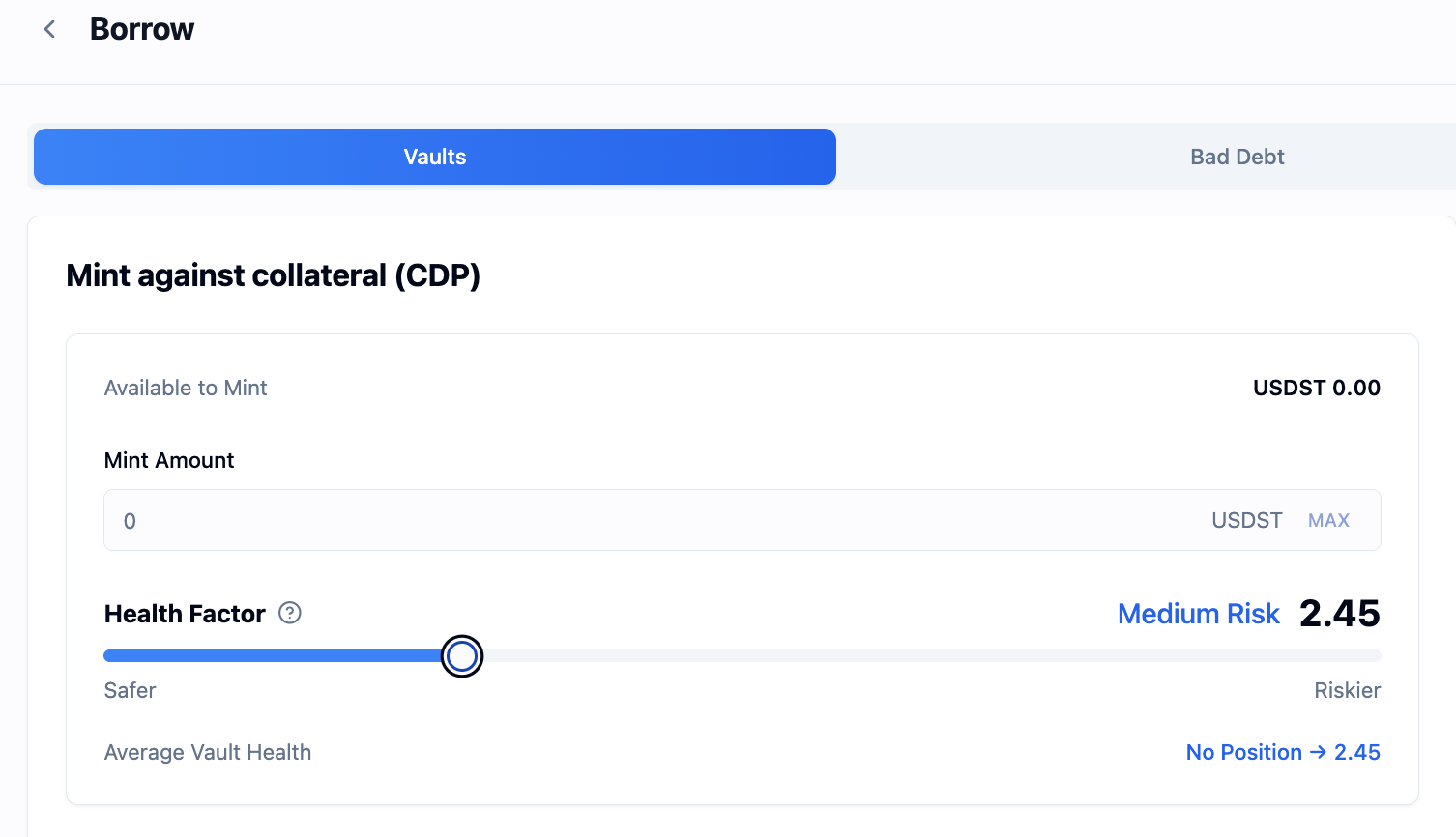
STRATO offers two borrowing routes. Lending (the Borrow page) charges ~5% interest but is flexible. CDP minting (under Advanced → Mint) charges a lower stability fee of ~2-3% and works better for longer-term positions. Both earn Reward Points.
Understanding the Health Factor
The Health Factor is the number that tells you how safe your borrowing position is. It's a ratio, not a fixed scale. The higher the number, the more room you have before your collateral is at risk.
The app shows it with color coding:
For beginners, stay above 2.0. If you're comfortable with the mechanics and want to borrow a bit more, 1.5 and above still gives you a meaningful safety buffer. A Health Factor of 1.8 means your collateral could drop roughly 40% in value before you'd face liquidation. That's a large cushion.
The formula: Health Factor = (Collateral Value x Liquidation Threshold) / Borrowed Amount. You don't need to calculate this yourself. The app shows it in real time and updates it as prices move.
What happens if you're liquidated?
Liquidation sounds alarming, but it's worth understanding what it means in practice. If your Health Factor drops below 1.0, a liquidator can step in and repay part or all of your debt on your behalf. In exchange, the liquidator takes your collateral plus a bonus (5-10%).
Here's what that looks like: say you had 1 ETHST as collateral and owed 2,400 USDST. If ETHST drops enough that your Health Factor falls below 1.0, a liquidator repays your 2,400 USDST debt and claims your 1 ETHST (plus the bonus). You lose the ETHST, but you keep the 2,400 USDST you borrowed. There are no further penalties, no margin calls, no debt collectors. The loss is limited to the difference between your collateral value and the debt, plus the liquidation bonus.
The practical takeaway: liquidation is avoidable. Keep your Health Factor above 2.0, and you'd need a catastrophic price drop (50%+) for it to become relevant. If prices do start moving, you have two options: add more collateral or repay some of your debt. Both push the Health Factor back up immediately.
Earn
Open Earn to deposit assets into vaults or liquidity pools. Each product shows its current APY and whether it earns Reward Points.
- Open Earn.
- Choose a vault or pool.
- Read the APY and points information.
- Deposit the asset the product requires.
- Confirm.
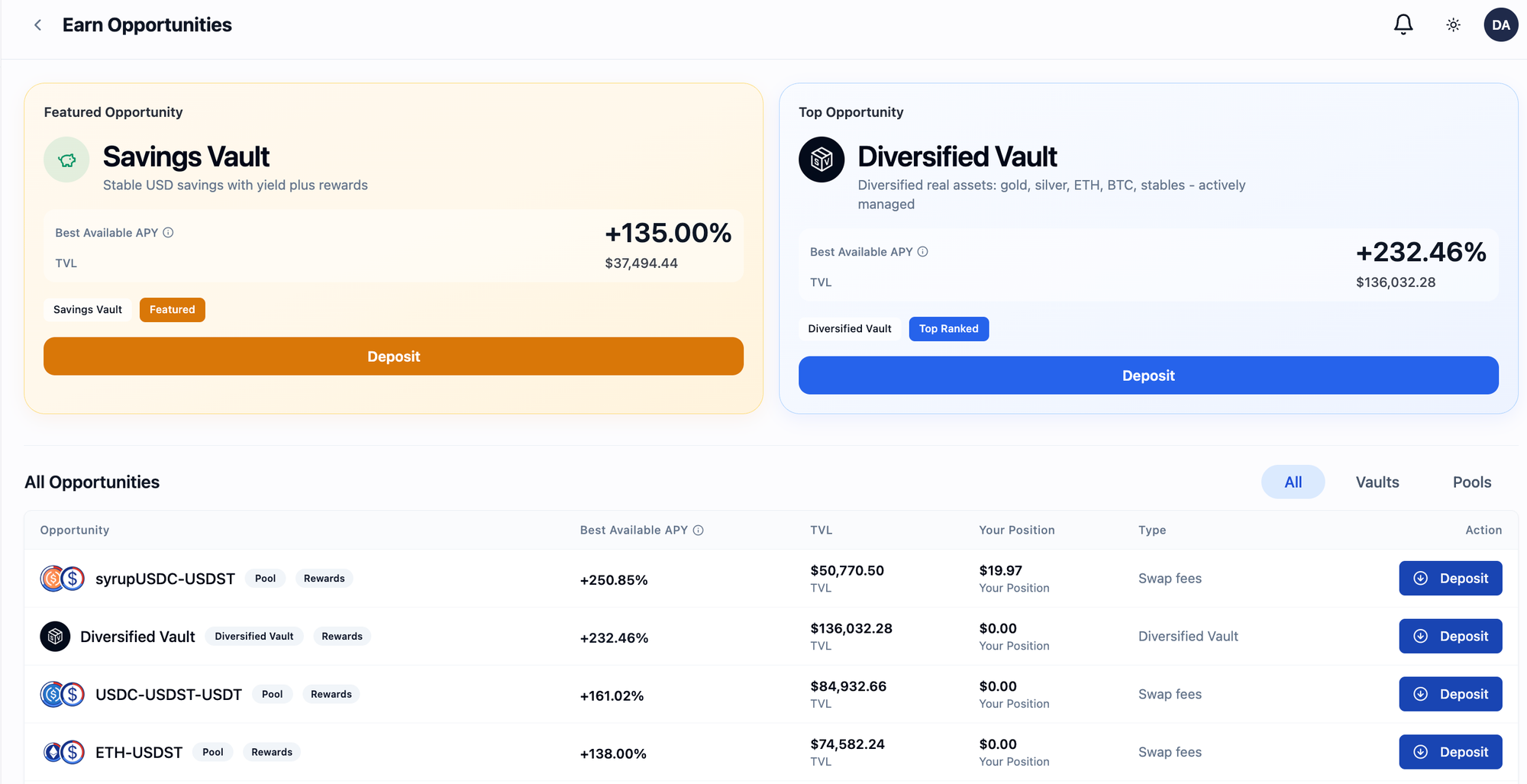
Example: You have 25 USDST. Open Earn, choose the Savings Vault (saveUSDST), press Deposit, enter 25, confirm. Your position starts earning yield and Reward Points immediately.
The saveUSDST vault is the simplest earning product on STRATO. It's an ERC-4626 savings vault where you deposit USDST and earn yield automatically. No pool management, no pair matching.
Rewards
Open Rewards to see which of your actions are earning campaign points in STRATO Rewards season 2. This page doesn't replace Earn. It shows the point-earning status of positions you already hold that will increase your token allocation for our TGE.
Season 2 covers 10 activities across five categories: six liquidity pool LPs (ETHST-USDST, GOLDST-USDST, SILVST-USDST, sUSDS-USDST, syrupUSDC-USDST, USDC-USDT-USDST), CDP USDST Mint, saveUSDST Stake, Vault Token Deposits, and Direct Mint USDST.
Each activity has a daily point emission rate. Your share of the points depends on your stake relative to the pool total. Check the Rewards page for current emission rates and estimated incentive APY.
Buy Metals
Open Fund, choose Buy Metals, select the metal asset, enter the amount, and confirm. This is how you get tokenized gold (GOLDST) and silver (SILVST) exposure on STRATO.
Withdrawals
To move assets off STRATO, they need to be free in your wallet first. If an asset is in a vault, withdraw it. If it's in a pool, remove liquidity. If it's backing a borrow position, repay the USDST debt first, then withdraw the collateral. Once Portfolio shows the asset as available, open Withdrawals and choose your target network.
Bridging out can take time, and you may need Ethereum gas on the claim side.
Part 4: Yield Maxxing
Once you're comfortable with the basics, you can combine STRATO's features to earn from multiple sources at once. The general idea: borrow or mint USDST against your collateral, then deploy that USDST into earning products. You pay interest on the borrow, but you earn trading fees, savings yield, and Reward Points on the deployed capital. If the yield exceeds the borrow cost, you profit while keeping your original asset.
The simplest version:
Supply collateral (e.g. 10 ETHST) → Borrow USDST at a conservative ratio (keep Health Factor above 2.0) → Deposit the USDST into saveUSDST or a liquidity pool → Earn yield and points while keeping your ETHST exposure.
A more active version:
Borrow USDST → Swap half to sUSDSST (a yield-bearing stablecoin built on Sky protocol) → Deposit both into the sUSDSST-USDST liquidity pool. This earns LP trading fees, the Sky savings rate on the sUSDSST portion, and Reward Points. Because both sides of the pool are dollar-pegged, impermanent loss stays minimal.
Other approaches from the Maximize Yield guide:
Mint via CDP instead of borrowing through lending. The stability fee is lower (2-3% vs 5%), which means more of your LP income is profit. This works better for positions you plan to hold for months rather than weeks.
Provide liquidity in higher-APR pools like ETHST-USDST or GOLDST-USDST. These can offer 15-30% APR but carry more impermanent loss risk since the pairs are volatile. Only use volatile pairs if you aren't also leveraged.
Recursive borrowing is a strategy where you borrow USDST, swap it to more collateral, supply that collateral, and borrow again. This amplifies both gains and losses. It's high risk and not recommended for beginners.
Example cost/income breakdown (illustrative, all rates variable):
You keep your 10 ETHST the whole time. If ETHST appreciates, you benefit from that too. And remember: when you're done, you repay the USDST debt plus accrued interest, withdraw your collateral, and you're back where you started, plus whatever yield you earned.
Explore Earn Opportunities → | Full Yield Maxxing Guide →
Safety rules for yield maxxing:
Keep your Health Factor above 2.0. Use stable-stable pairs (like sUSDSST-USDST) when you're borrowing against volatile collateral. Check your Health Factor when your collateral asset moves more than 10%. Don't borrow the maximum the screen offers. Keep some USDST in your wallet for gas and emergency collateral top-ups.
To exit: remove liquidity from the pool first, swap sUSDSST back to USDST if needed, repay your borrow debt plus any accrued interest, then withdraw your collateral. Only free assets can be bridged out.
Part 5: Tracking Everything
The operating pattern on STRATO: bridge in, use the product screen for the action you want, monitor Portfolio and Rewards, and use Withdrawals when assets need to move back out.
Check Portfolio for position status. Check Rewards for point-earning status. Check the Earn page for current APYs on vaults and pools. All rates are variable and change based on pool utilization, trading volume, and market conditions. Always check current rates in the app before opening a position.
Get Started on the STRATO App →
For support: Telegram | Docs | Support Portal
Start earning on STRATO
Bridge crypto, borrow against gold and silver, and put your assets to work.
Launch App